
Canon and iPhone
Mounting an iPhone on a camera hot shoe: the mount, the cable, the length
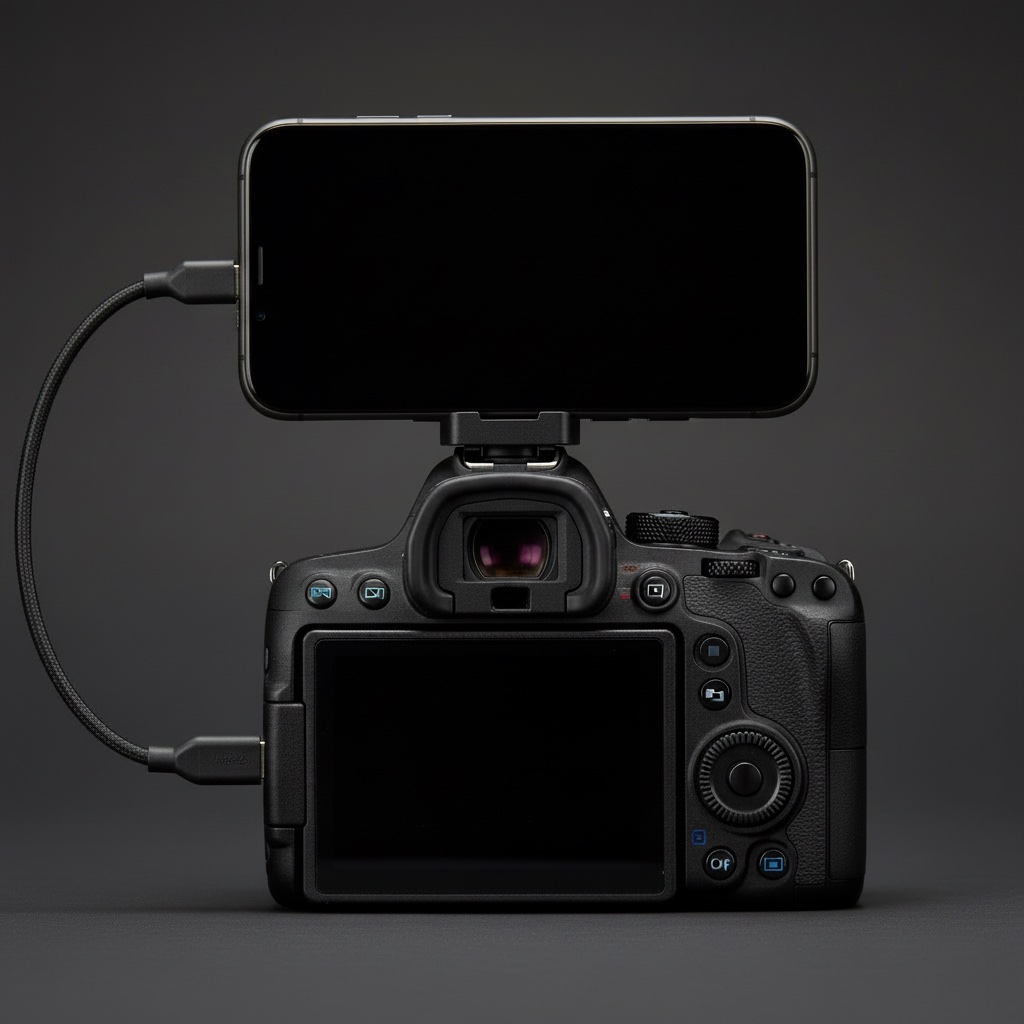
A phone that is tethered to the camera and sitting in your pocket is a phone you never look at. The whole point of live shots is seeing them, and showing them, without putting the camera down. The answer is the hot shoe, a magnet, and a cable short enough to forget about.
The mount
Look for a MagSafe mount with a cold-shoe foot. It is a metal MagSafe ring on a small ball head, with a slide-in foot that fits the camera's hot shoe. Several brands make one; the ones with a ball head and a locking collar are worth the few extra dollars because the phone will not droop over an afternoon. Any iPhone 12 or later with MagSafe snaps on. If your case blocks MagSafe, use a MagSafe-compatible case or a stick-on ring.
- Ball head: lets you tilt the phone toward your eye and swing it round to show someone the screen.
- Cold shoe, not a flash: the hot shoe's contacts are unused. The mount is just sitting in the rails.
- Landscape: the phone lies flat along the top of the camera. Lower centre of gravity, nothing sticking up into the viewfinder's eye line, and a grid of shots reads better wide.
The cable
USB-C to USB-C, data, short. Three things, and the first two are where people go wrong.
- Data. A lot of USB-C cables, especially the ones that came with a charger, carry power only. The camera will not appear on the phone and nothing will tell you why. Canon's IFC-100U is the no-doubt option. Any short cable sold as USB 3 from a known brand is fine.
- Short. The camera's port is on its left side, the phone is on top. 30 cm covers it with a loop to spare. A 1 m cable will swing into the lens, catch on a strap and pull the plug out on a crowded pavement.
- Right angle plugs at the camera end keep the cable close to the body and take strain off the port. Optional, but nice.
Test the cable at home. Plug in, open Photos on the iPhone, look for the Import tab. If the camera shows up, the cable is right. If not, it is the cable, before it is anything else.
Routing it
Out of the camera's side port, up behind the mount, into the phone's port on the end that faces you. Loop the slack once and tuck it under the mount's ball head. The cable should never pass in front of the lens or across the viewfinder. If the camera has a port cover, leave it open; closing it on the cable will crack the hinge.
Weight and balance
An iPhone and mount add about 250 g on top of the body. On a full-frame R body it is not noticeable; on a small R50 it tips the balance a touch. Either way the strap takes it. Keep the ball head locked, and check the collar at the start of each walk.
The screen itself
In daylight, turn the phone's brightness up and auto-lock off while shooting. You want the grid visible at a glance and the QR code bright enough to scan without shading it. Expect the phone battery to go down faster than usual; an hour of live shots and a bright screen costs around a fifth of a charge.
Showing someone the code
With the phone on the hot shoe you turn the whole camera toward them, screen first, and they scan it from a step away. It feels strange the first time and perfectly normal the third. If you would rather not wave a camera at a stranger, the code can also be on your watch: QR code on Apple Watch.
Alternatives that mostly do not work
- Phone in a chest pocket: you never look at it, and the cable is at full stretch.
- Phone on a strap clip: swings, pulls on the port, and the screen faces the ground.
- Phone in hand: you have one hand on a camera and a stranger in front of you. Not for long.
Questions people ask
Will the phone fall off a MagSafe mount?
Not when walking. The magnets hold through a case that is MagSafe-compatible. A sharp knock can shift it, so lock the ball head and check it after you bump into something.
Does the cable need to be USB 3?
No. USB 2 data speeds move a Large JPEG in about a second, which is plenty. "USB 3" on the packaging is mostly a guarantee that it is a data cable.
Can I mount it in portrait instead?
You can, with the ball head turned. It puts the phone up into your eye line when you use the viewfinder and the grid reads worse. Landscape is the setup StreetKit's app is laid out for.
Keep reading
Canon and iPhone
How to tether a Canon to an iPhone over USB-C
The cable, the one camera menu that matters, and the two ways shots can land on the phone.
 Sharing photos
Your QR code on an Apple Watch: turn your wrist, they scan
With the phone on the camera, the share code moves to your wrist. What the watch app does and does not do.
Sharing photos
Your QR code on an Apple Watch: turn your wrist, they scan
With the phone on the camera, the share code moves to your wrist. What the watch app does and does not do.
 Canon and iPhone
Canon EOS R3 to iPhone over USB-C: the settings that work on the street
The exact menu settings on the R3, from a camera that has been walked around with a phone on it.
Canon and iPhone
Canon EOS R3 to iPhone over USB-C: the settings that work on the street
The exact menu settings on the R3, from a camera that has been walked around with a phone on it.
 On the street
Street portrait camera settings that work in twenty seconds
Av at f/2.8 to f/4, 1/250 minimum, Auto ISO, eye detection on. Why, and where it is in the Canon menu.
On the street
Street portrait camera settings that work in twenty seconds
Av at f/2.8 to f/4, 1/250 minimum, Auto ISO, eye detection on. Why, and where it is in the Canon menu.