
Sharing photos
Share photos with a QR code: what the other person sees, and what you keep
A QR code is a web address in a picture. That is all it is. Point a phone camera at it and the phone offers to open the address. What makes it useful for photos is what sits behind the address: a page that shows the right pictures to the right person and lets them keep them. Here is how StreetKit's version works, step by step, so you know exactly what you are handing someone.
What is in the code
A link to a page on streetkit.app with a long random token at the end. The token is the whole secret: it is not guessable, it is not listed anywhere, and it points at one group of photos. There is no account on their side, no sign-in, and nothing in the code about you beyond your public profile name.
Each group has its own code. Maya and Tom's code opens Maya and Tom's shots and nothing else. The person you photographed an hour earlier is on a different page with a different token. Nobody sees anyone else's photos.
What happens when they scan it
- They open their camera app (iPhone or Android, no QR app needed) and point it at your screen.
- A banner says "Open streetkit.app". They tap it.
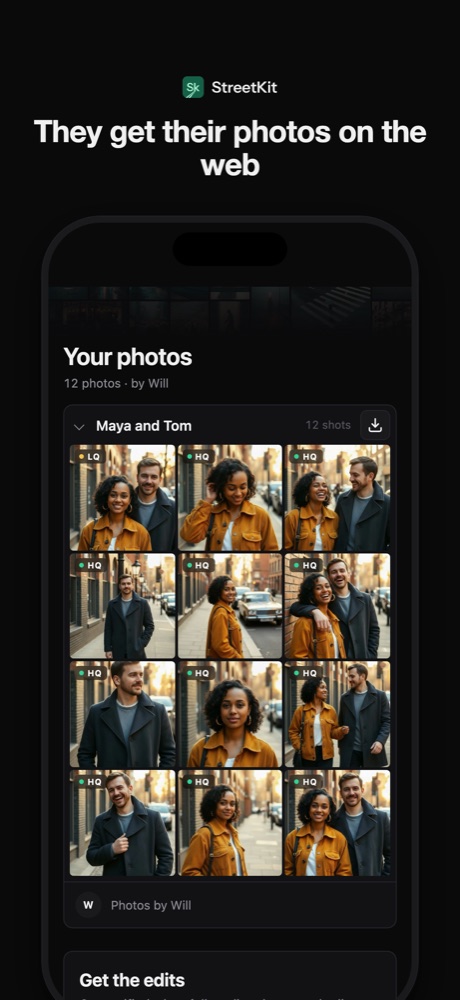
- Their browser opens a page with the group's name, the count, and the photos as a grid.
- The grid shows previews within a few seconds, pulled from your phone's upload as it happens. Each tile is marked as the preview or the full-quality file.
- They tap a photo to see it large, swipe through, and tap Save to Photos on an iPhone (the system share sheet), or download the file anywhere else. Save all takes the whole group.
Previews first, full size after
Your phone uploads a small preview of each shot the moment it arrives from the camera, over any connection. The full-size originals go up over Wi-Fi by default (you can allow cellular), so on the street the person sees previews immediately and the big files switch in as your phone gets a chance. The page updates on its own; they do not need to refresh or come back.
This is a deliberate trade. A 25 MB JPEG over a weak signal takes a while; a preview takes a second. The person gets something now, and the thing they get later is the real file.
What they can leave for you
Under the photos is a card that asks, once, for an email, with the option of a name and a mobile number. It is skippable. If they fill it in, you get a notification on your phone, and the contact shows up next to that group in the app. Guests never see each other's details, and you never see anything they did not type.
What you keep
- The originals on your phone and in your Photos library, whatever happens online.
- The group, its shots and any contact they left, in the app, next to each other.
- Control. Delete the group and the link stops working. Delete your account and every link you ever handed out stops working.
Things to know before you hand it over
- Links do not expire on their own. They work until you delete the group or your account.
- Their browser remembers the groups it has opened, so they can come back to the page later without the code.
- Anyone with the link can open it. If Tom forwards it to Maya, Maya sees the same page. That is a feature for pairs and a thing to know for everyone else.
- Someone who wants their photo taken down can ask you, or email support@streetkit.app, and it comes down.
The code on your wrist
If the phone is on the camera's hot shoe, holding it up to a stranger means unmounting it. StreetKit's Apple Watch app shows the current group's code on the watch, so you turn your wrist and they scan. More on that.
Questions people ask
Does the person need the StreetKit app?
No. The code opens a web page in their browser. The app is only on the photographer's phone.
Does it work on Android?
Yes. Any phone camera that reads QR codes opens the page, and any browser downloads the files. Save to Photos as a one-tap action is an iPhone feature; Android gets a normal download.
Can I send the link instead of showing the code?
Yes. Hold the code to copy the link and text it, or AirDrop it. Useful when the phone is mounted on the camera and the person is already across the street.
Is the page public or searchable?
Neither. It is reachable only by the link, which contains a long random token, and the pages are marked so search engines do not index them.
Keep reading
Sharing photos
How to send people the photos you took of them (without losing half of them)
AirDrop, text, Dropbox, a gallery, or a QR code on the spot. What each one costs and who actually gets their photo.
 Sharing photos
Your QR code on an Apple Watch: turn your wrist, they scan
With the phone on the camera, the share code moves to your wrist. What the watch app does and does not do.
Sharing photos
Your QR code on an Apple Watch: turn your wrist, they scan
With the phone on the camera, the share code moves to your wrist. What the watch app does and does not do.
 Sharing photos
Same-day photo delivery: proofs on the spot, edits when they are ready
Two deliveries: proofs before they leave, edits by email when done. What it takes to do that tethered.
Sharing photos
Same-day photo delivery: proofs on the spot, edits when they are ready
Two deliveries: proofs before they leave, edits by email when done. What it takes to do that tethered.
 On the street
How to ask a stranger for a portrait (and what to say when they ask why)
What to say, word for word, the three seconds that decide it, and what to do with the no.
On the street
How to ask a stranger for a portrait (and what to say when they ask why)
What to say, word for word, the three seconds that decide it, and what to do with the no.